2.1.1. Lab – Lab Preparation and Packet Processing
2.1.1.1. Task – BIG-IP VE System Configuration
Access your BIG-IP and verify it is configured properly.
Open a new Web browser and access https://10.1.1.245. Log into the BIG-IP VE system using the following credentials: Username:
adminPassword:adminCheck the upper left-hand corner and ensure you are on the active device the status should be ONLINE (ACTIVE). Most deployments are active-standby and either device could be the active device.
On the System >> Resource Provisioning page ensure Local Traffic (LTM) and Application Visibility and Reporting (AVR) modules are provisioned.
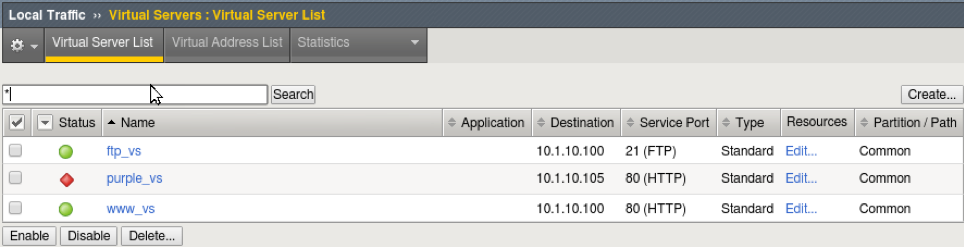
Go to Local Traffic >> Virtual Servers and verify your virtual server states. They should match the graphic.
Note
This BIG-IP has been pre-configured and the purple_vs virtual server is down on purpose.
2.1.1.2. Task – Open BIG-IP TMSH and TCPDump session
In this task, you will open two SSH sessions to the BIG-IP. One for TMSH commands and the other for tcpdump of the client-side network.
- Open command/terminal window (window1) from the shortcut bar at the bottom of the jumpbox.
- ssh root@10.1.1.245
Password:
default
- ssh root@10.1.1.245
Password:
- Use tcpdump to monitor traffic from the client (10.1.10.51) destined to ftp_vs (10.1.10.100)
- tcpdump –nni client_vlan host 10.1.10.51 and 10.1.10.100
- Open command/terminal window (window2).
- ssh root@10.1.1.245
- Use tmsh to display connection table, at the Linux command prompt type:
- tmsh
- At the TMOS prompt (tmos)#
- show sys connection
Attention
Q1. Do you see any connections from the jumpbox 10.1.1.51 to 10.1.1.245:22?
Q2. Why are the ssh management sessions not displayed in connection table?
2.1.1.3. Task – Establish ftp connection
In this task you will open a third terminal window and establish an FTP session through the ftp_vs virtual server. With the connection remaining open you will view the results in window1 (tcpdump) and window2 (tmsh).
Open a third terminal window on the Xubuntu client (window3).
- ftp 10.1.10.100
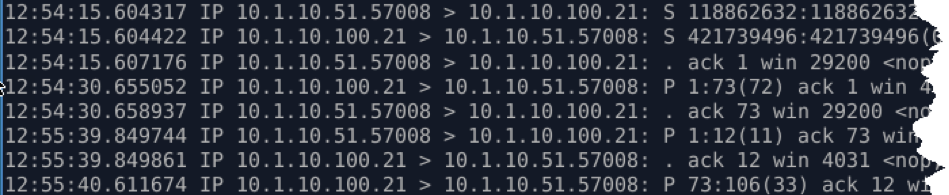
In window1 you should see something similar to the tcpdump captured below.
Attention
Q1. In the tcpdump above, what is client IP address and port and the server IP address port?
In window2 (tmsh) run the show sys conn again, but strain out the noise of other connections (mirrored and selfIP) by just looking at connections from your jumpbox.
- show sys conn cs-client-addr 10.1.10.51
The connection table on window2 will show the client-side and server-side connection similar to below

Attention
Q2. What is source ip and port as seen by ftp server in the example above?
Q3. What happened to the original client IP address and where did 10.1.20.249 come from?
Hint
You will have to review the configuration of ftp_vs to determine the answer to this question.